







Focus Stacking on iPhone, Built Directly Into Pro Camera
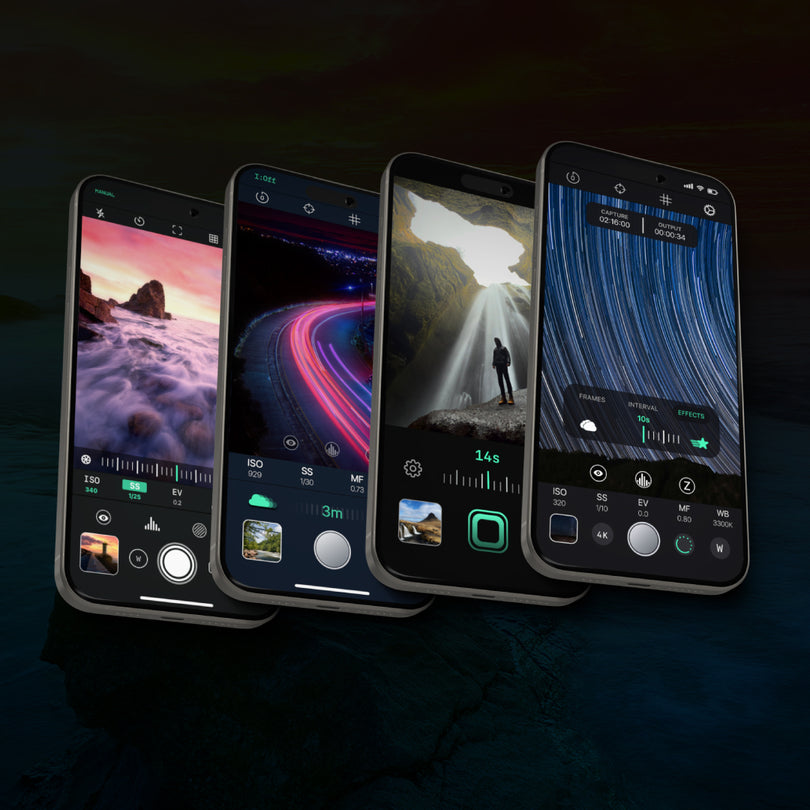
Pro Camera 3.5 introduces the world’s first camera app experience that lets you capture Focus Brackets, align them, and create Focus Stacks directly in app for sharper macro, product, landscape, and close-up photography.
A Fully Stacked Image, Directly on iPhone
Focus Stacking allows you to combine multiple focal planes into one final image with greater depth of field. Fine details that would normally fall out of focus in a single shot can now be merged into a sharper final result directly inside Pro Camera.

From Focus Bracketing to Finished Focus Stacks
Until now, Focus Bracketing on mobile usually meant capturing a sequence of images, exporting them, and merging them later with desktop software. Pro Camera 3.5 changes that workflow.
You can now capture the focus bracket, align the images, and stack them directly in app. No desktop software. No cloud upload. No broken workflow.
What Is Focus Stacking?
Focus Stacking is a photography technique that combines multiple images captured at different focus distances. Each image contains a different sharp area of the scene. A stacking algorithm then merges the sharpest parts of each frame into one final photo with a deeper depth of field.
This is especially useful for iPhone macro photography, product photography, landscape photography, jewelry, flowers, insects, textures, miniatures, and any close-up subject where a single image cannot keep everything sharp.

Why Focus Stacking Matters
Macro & Close-Up
Macro and close-up images often have a very shallow depth of field. Focus Stacking helps extend sharpness across more of the subject.
Product & Still Life
Fine textures, product edges, jewelry details, and small surfaces can remain clearer across the final stacked image.
Landscape
Landscape photographers can use Focus Stacking to keep foreground details and distant background elements sharper in the same final image.
How Focus Stacking Works in Pro Camera 3.5
Pro Camera 3.5 gives you precise control over the entire Focus Stacking workflow, from the initial focus bracket to the final stacked image.
Select Focus Range
Set the minimum and maximum focus points using a precise focus scale from 0 to 1.

Capture the Bracket
Choose how many images Pro Camera should capture across the selected range, up to 100 photos.

Choose the Anchor
Select the reference image used to align the rest of the stack before merging.

Stack Images in App
Pro Camera aligns the sequence and merges the sharpest areas into one final image.

Example: Focus Range 0.2 to 0.8
If you set your focus range from 0.2 to 0.8 and choose 20 shots, Pro Camera automatically captures 20 images across the selected focus interval.
This creates a controlled focus sweep from the closest selected point to the farthest selected point, giving photographers maximum flexibility while keeping the workflow simple and intuitive.
Built for Different Subjects, Speeds, and Workflows
In Settings, under Focus Bracketing & Stacking, Pro Camera lets you choose how the app captures and prepares focus brackets. These options balance capture speed, texture quality, system load, and stacking readiness.

Choose the Right Bracketing Speed
Moving subjects need speed. Static subjects can prioritize quality. Balanced workflows can adapt capture and preparation depending on whether you want faster bracketing or faster stacking.
This gives photographers more control when shooting insects, flowers, product details, studio macro scenes, landscapes with foreground interest, or outdoor subjects affected by wind and movement.
Fast
Fast prioritizes the fastest possible bracket capture. It is useful for subjects that may move at any moment, such as insects or flowers in the wind. Texture quality is reduced and 48MP is not supported.
Slow
Slow processes each photo before capturing the next one. It is slower, but keeps texture quality high, supports 48MP, and helps keep system load low. Ideal for static subjects such as flowers, products, indoor macro setups, and controlled landscape compositions.
Balanced
Balanced keeps texture quality high and lets you choose whether to prioritize faster bracket capture or faster stacking preparation.
Alignment Before Stacking
Focus Stacking is not only about merging sharp areas. Before the final stack is created, the captured images need to be aligned.
Pro Camera 3.5 includes an alignment process that stabilizes and prepares the sequence before stacking. This helps compensate for small framing shifts between photos, especially in handheld macro photography, product photography, landscape scenes, or outdoor close-up work.
Fast Alignment
A faster alignment option designed for quicker results when the sequence does not require maximum precision.
Balanced Alignment
The recommended option for most workflows, balancing alignment quality and processing speed.
Precise Alignment
A slower and more accurate alignment option for sequences that require extra precision before stacking.
What Is the Anchor Image?
The anchor is the reference photo used to align all the other images in the stack. In Pro Camera 3.5, users can choose which frame to use as the anchor. For best results, select the image where the main subject is most clearly in focus.
Stacked On Device. No Internet Required.
The new Focus Stacking algorithm runs entirely on your device. No internet connection is required, and your photos do not need to be uploaded to external software or cloud-based services.
This keeps the workflow fast, private, and fully under your control. Your images stay on your device, helping protect your privacy, your creative work, and the copyright of your photos.
Built In-House to Push Mobile Photography Further
After months of development and testing, the REEFLEX software team built a new stacking algorithm designed specifically for mobile photography.
The goal was to transform a traditionally desktop-based workflow into a faster, more accessible, and fully integrated experience inside Pro Camera. Capture, align, stack, and create directly on iPhone.
Included for All Pro Camera Users
Focus Stacking is included in Pro Camera 3.5 for all users. Update the app and start creating sharper macro, product, landscape, and close-up images with a complete in-app Focus Bracketing and Focus Stacking workflow.
Focus Stacking FAQ
What is Focus Stacking?
Focus Stacking is a technique that combines multiple photos captured at different focus distances into one final image with a deeper depth of field. It is especially useful for macro photography, product photography, landscape photography, flowers, insects, jewelry, textures, and close-up subjects.
What is the difference between Focus Bracketing and Focus Stacking?
Focus Bracketing is the capture process: the camera takes multiple images at different focus distances. Focus Stacking is the merging process: the sharpest areas from those images are combined into one final photo.
Can I do Focus Stacking directly on iPhone with Pro Camera 3.5?
Yes. Pro Camera 3.5 lets you capture a focus bracket, align the images, and stack them directly in app on iPhone.
Is Pro Camera the first app with in-app Focus Stacking?
Pro Camera 3.5 introduces the world’s first camera app experience that combines Focus Bracketing, alignment, and Focus Stacking directly in app.
Is Focus Stacking useful for landscape photography?
Yes. Focus Stacking can help landscape photographers keep close foreground details and distant background elements sharper in the same final image, especially when a single focus point is not enough.
Does Focus Stacking in Pro Camera require an internet connection?
No. The Focus Stacking algorithm runs locally on your device, so no internet connection is required.
Are my images uploaded to the cloud for stacking?
No. Pro Camera processes the stack on device. Your images do not need to be uploaded to cloud services or external software, helping keep your photos private and under your control.
Which bracketing speed should I choose?
Use Fast for subjects that may move, such as insects or flowers in the wind. Use Slow for static subjects where texture quality is more important than speed. Use Balanced when you want high texture quality with flexible control over whether to prioritize bracketing speed or stacking speed.
What is the anchor image in Focus Stacking?
The anchor image is the reference frame used to align the other photos in the stack. For best results, choose the frame where the main subject is most clearly in focus.
Does Pro Camera align images before stacking?
Yes. Pro Camera 3.5 aligns the captured images before stacking them. This helps stabilize the sequence and prepare the photos for a cleaner final merge.
Start Creating Focus Stacks on iPhone
Capture up to 100 focus-bracketed images, align them, and stack them directly in Pro Camera. After months of testing, in-app Focus Stacking is finally yours.
Download Pro Camera